MatchDog is a small dog rescue in San Jose. One location. More good dogs than homes.
That's the problem in a sentence. These shelters aren't short on dogs that deserve a family. They're short on the right person finding the right dog at the right moment.
And "the right dog" means something completely different to a nervous first-timer than it does to a lifelong dog person.
So this was never really about building an adoption app. It was about building a matchmaker, something that could understand who was on the other side of the screen.
I designed the part an adopter actually holds in their hand: finding a dog, getting to know it, and feeling sure enough to go meet it in person.
The brief: Design a mobile app for MatchDog that helps people find, learn about, and schedule a visit with a rescue dog.
The constraint that shaped everything: This was a conceptual-model course. Structure before screens: no layouts until the grammar was right. What objects exist in this system? What can users do with them? What matters about each one? Get that right first, and the navigation follows.
The questionnaire wasn't just about preferences. It determined whether a live dog was even the right match. If someone's lifestyle wasn't a fit, the app would guide them toward a robot dog alternative instead.
Not screens first. Grammar first.
Before any layout decisions, the team mapped out the system underneath the app: who's using it, what they need, and what the app needs to know about both.
The People
Four personas, each built around one question: why do they want a dog?
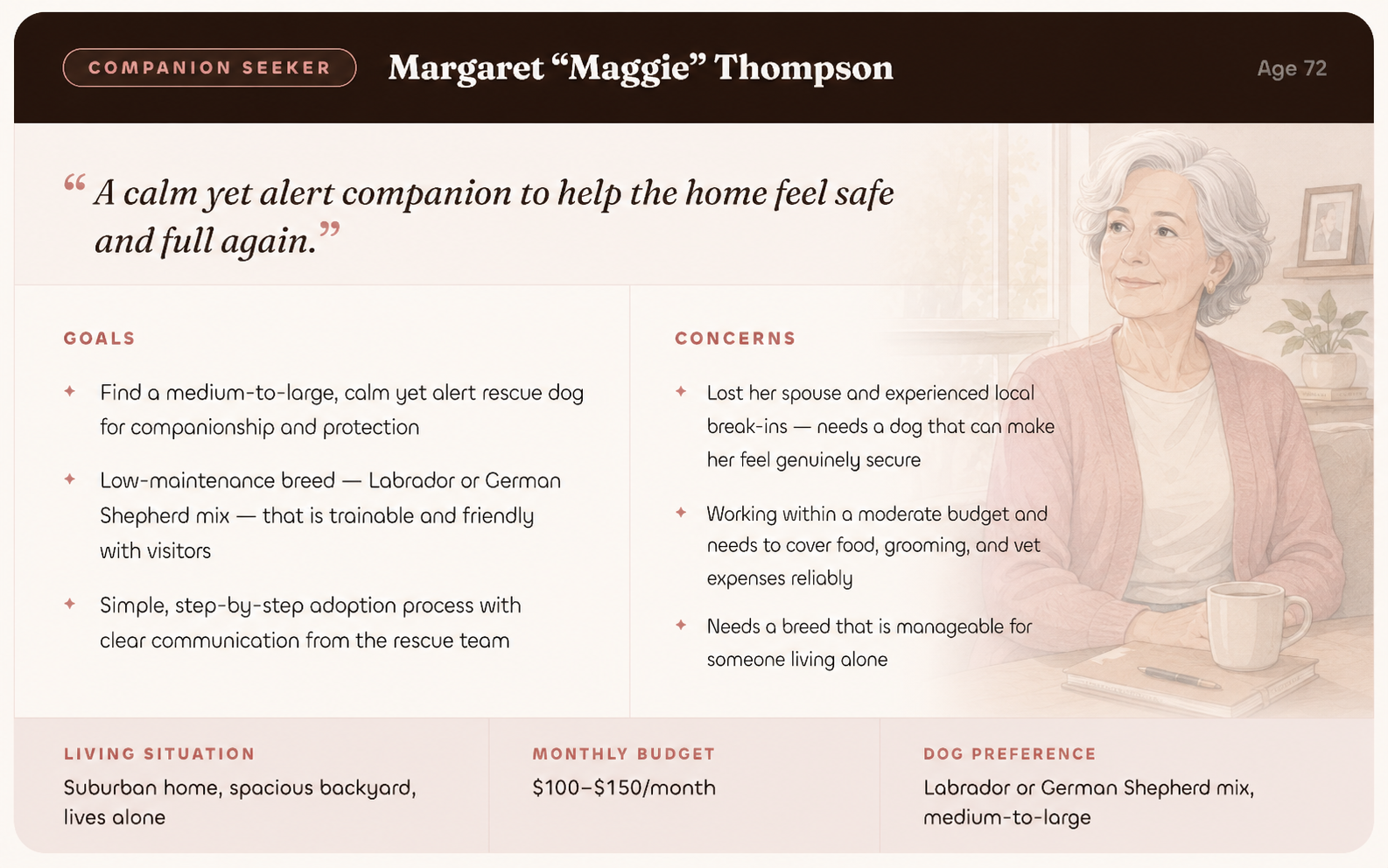
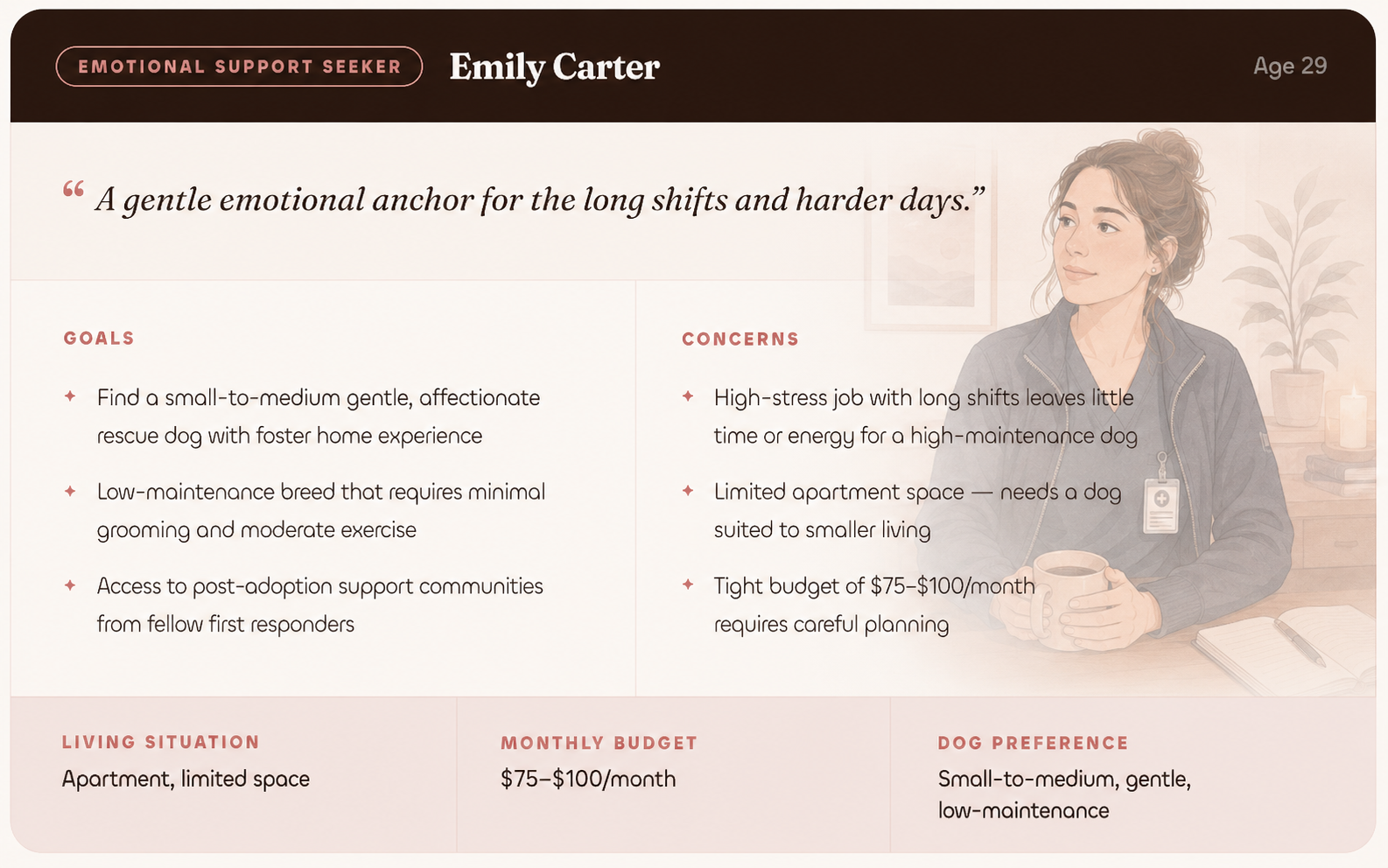
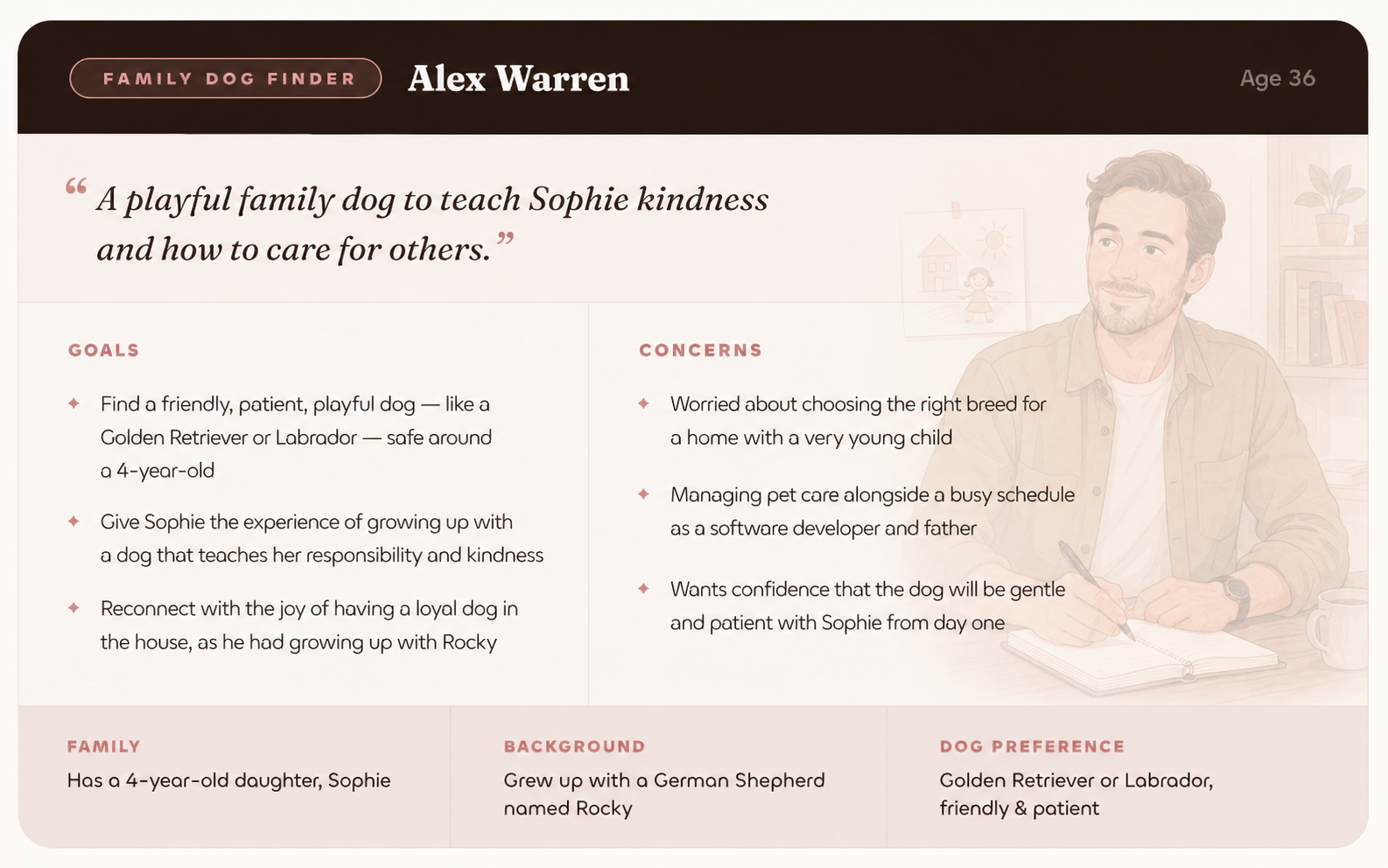
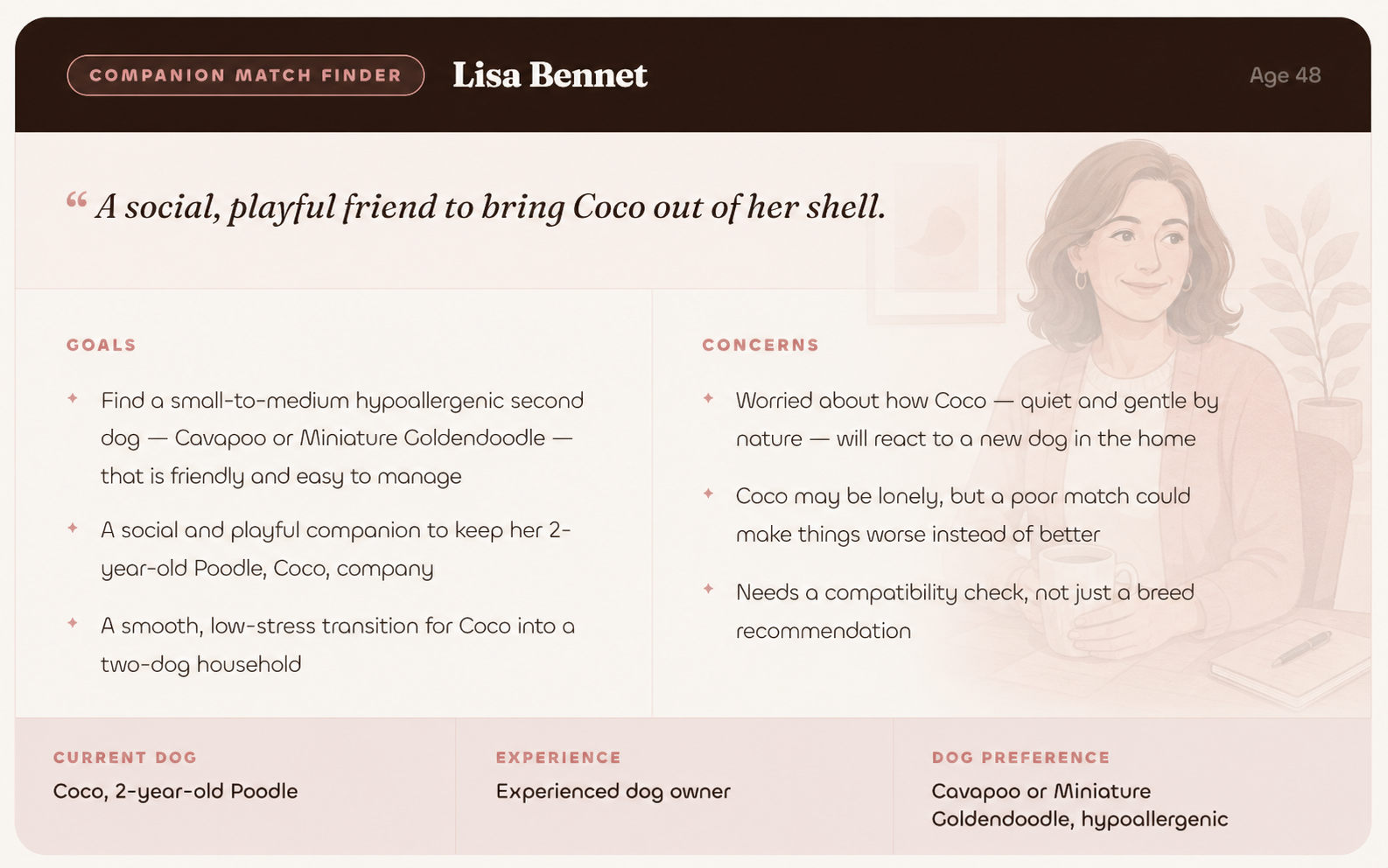
Demographics came second. The empathetic need came first.
The Journey
- Starts researching but uncertain where to begin
- Realizes they need structured guidance
- Commits to MatchDog and moves forward
- Begins sharing lifestyle details to find the best match
- Waits for matches; reviews initial results
- Explores matched dogs and narrows down choices
- Reviews matches and gets attached to a specific dog
- Second-guesses the decision
- Makes a final choice and is ready to meet their dog
- Finds the best time and shelter for the visit
- Ensures they have the right documents
- Finalizes the appointment with excitement
- Takes the first step in sharing their adoption experience
- Creates a first post and interacts with the community
- Becomes an ongoing contributor and advocate
I want a dog, but I don't know where to start.
I hope I get matched with a great dog.
Which of these dogs is the best fit? What if it doesn't work out?
I need to schedule my visit soon. What should I bring?
People love my dog! This is amazing. MatchDog changed my life.
- Browsing pet adoption info; taking a readiness quiz
- Signing up for MatchDog; downloading the app
- Exploring adoption resources on MatchDog
- Answering lifestyle questionnaire
- Scrolling through matched dog profiles; saving favorites
- Re-reading dog bios; considering a consultation
- Comparing matched dog profiles; watching intro videos
- Reading return and trial policies
- Clicking "Adopt This Dog" and proceeding to scheduling
- Checking available shelter time slots
- Viewing adoption checklist; confirming appointment
- Downloading confirmation details
- Exploring community page; writing a "Gotcha Day" post
- Responding to comments; joining discussions
- Uploading more posts; clicking "Support Our Mission"
- Blog posts, guides, educational videos
- Interactive quizzes; adoption success stories
- Welcome email and personalized walk-through
- AI-driven onboarding quiz; matching algorithm
- Dog profile pages with filtering options
- Adopter testimonials and success stories
- AI-based match summary; live chat with counselors
- User testimonials; reassurance guides
- Shelter confirmation; adoption scheduling system
- Appointment scheduler; availability calendar
- Push notifications; email confirmation
- Auto-generated calendar invite
- Social media campaigns; UGC features
- Post templates; featured stories; push notifications
- Loyalty program; annual adoption anniversary messages
- Notices first dog's loneliness, considers getting another
- Researches shelters, breeders, and rescues
- Chooses a trusted source; ready to start the process
- Starts searching with compatibility as the key filter
- Shortlists dogs by breed, energy, and temperament
- Selects a dog after reading reviews, but wants more confidence
- Decides to use a matching service for added confidence
- Starts filling the questionnaire, realizes the complexity
- Compares match results against their already-chosen dog
- Decides to meet the matched dog via the app
- Worries about compatibility and logistics of pickup
- Successfully picks up the dog and begins integration
- Considers sharing their adoption story in the community
- Starts drafting the experience; gathers photos and videos
- Engages with comments; feels part of the community
My dog could use a companion. I already know how to care for a dog.
I need a dog that matches my first dog's personality. What if they don't get along?
I know what I want, but a matching service will help find the best fit for my first dog.
Will my first dog accept the new dog? I want a clear, smooth process.
I'm glad I shared, it might help someone else. This platform is valuable.
- Researching multi-dog household tips
- Checking social media groups and vet clinics
- Reading adoption policies and reviews
- Using filters to refine search (breed, age, temperament)
- Reviewing dog profiles, temperament tests, medical history
- Watching video clips; saving final selections
- Using AI-driven questionnaire for compatibility
- Comparing match results with first dog's temperament
- Receiving push notifications with matches; finalizing choice
- Using in-app calendar; reviewing checklist (leash, crate, food)
- Checking FAQs for compatibility tips
- Downloading adoption agreement and onboarding guide
- Browsing community page and reading adoption stories
- Uploading photos and videos with captions
- Responding to comments; continuing to post updates
- Educational content on multi-dog households
- Video testimonials; multi-dog training tips
- Step-by-step adoption guides
- Video clips of available dogs; interactive chatbots
- Scheduling tools; digital adoption forms
- App's AI-driven questionnaire; automated notifications
- Expert consultation feature
- Emails from shelters and breeders
- In-app adoption checklist; expert advice for first meetings
- Shelter pickup instructions
- New pet onboarding guide
- Notifications encouraging participation
- App's social features (likes, shares, comments)
- Featured posts; community leadership invitations
Two end-to-end journey maps: one for a first-time owner, one for someone who's done this before. Same destination, two completely different emotional arcs. The first-timer needs reassurance at every step. The experienced owner wants to cut to the chase.
Mapping both made one thing clear: the app needed to meet people where they were, not assume everyone arrived the same way.
The System Vocabulary
Object-Action Matrix
| Objects | Adopt | Donate | Learn | Contact | Share |
|---|---|---|---|---|---|
| People | ✦ | ✦ | ✦ | ✦ | ✦ |
| Dogs | ✦ | ✦ | ✦ | — | ✦ |
| Community | ✦ | ✦ | ✦ | ✦ | ✦ |
| Organization | ✦ | ✦ | ✦ | ✦ | — |
| Money | — | ✦ | ✦ | — | — |
Key Attributes per Object
The Object-Action Matrix translated those needs into the grammar of the system: every object a user interacts with (dogs, appointments, their profile, the shelter) and every action they can take on each one. The Attributes table defined what information mattered about each object.
This became the rulebook. Every navigation decision that followed came back to it.
What Gets Priority
Admin: Task Frequency
Consumer: Frequency × Reach
Not everything deserves to be on the home screen. The prioritization matrix separated high-frequency actions (browsing matches, viewing a dog's profile, scheduling a visit) from the lower-priority ones. That order became the skeleton of the navigation.
Before committing to a layout, I explored three different ways to organize the same app.
Each concept wasn't a different visual style. It was a different navigation grammar. Where do the most important things live? What does the bottom nav say about what this app thinks matters most?
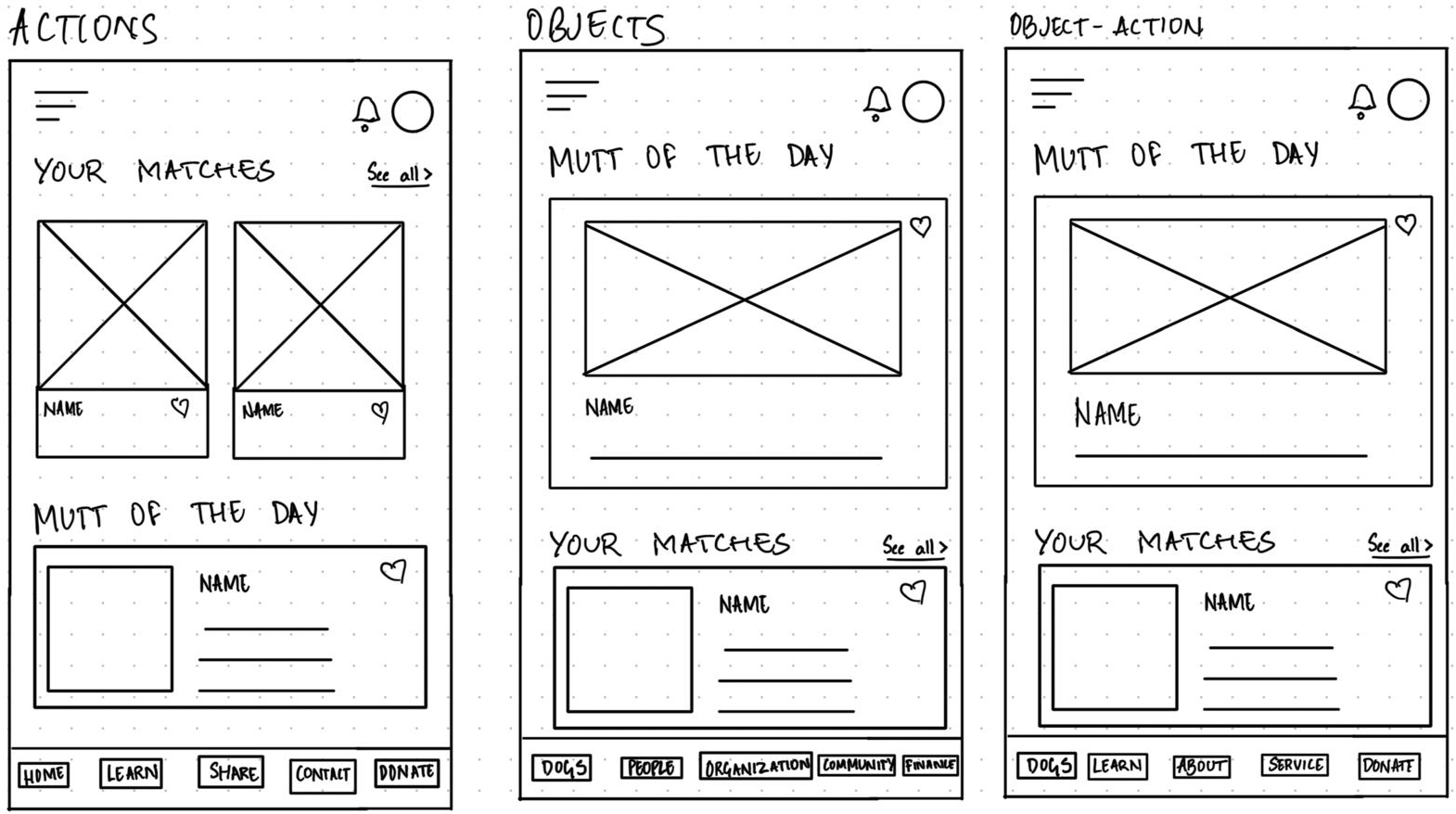
- Concept A (Actions-first): The nav leads with what you do: Home, Learn, Share, Contact, Donate. The app organized around verbs.
- Concept B (Objects-first): The nav leads with what exists: Dogs, People, Organization, Community, Finance. The app organized around nouns.
- Concept C (Object-Action hybrid): A mix: Dogs, Learn, About, Service, Donate. The most common object (dogs) gets top billing, actions fill the rest.
The hybrid won. Leading with Dogs puts the most important thing front and center. That's why people are here. The rest of the nav supports the actions that matter most without overcomplicating the structure.
The grammar defined the system. The flows defined how someone moves through it.
Two user flows, built using the JJG notation method. Both end at the same place: a scheduled visit with a dog. But the path to get there looks completely different depending on who's walking it.
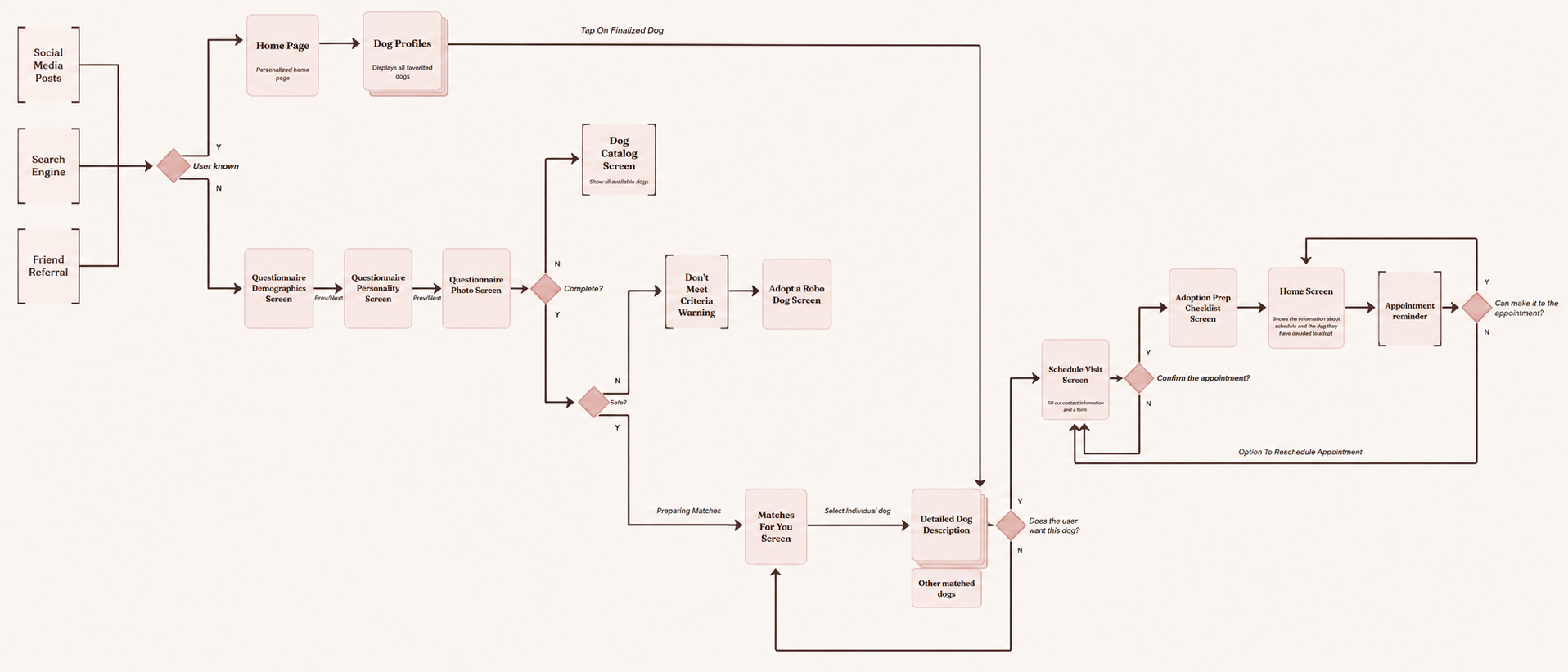
The first-time owner arrives uncertain. The app walks them through a three-part questionnaire first: demographics, personality, a photo upload. The AI uses those answers to generate a personalized set of matches. If the questionnaire determines a live dog isn't the right fit, the flow redirects to the robot dog option. If it does match, they land on their matches, explore individual profiles, and book a visit.
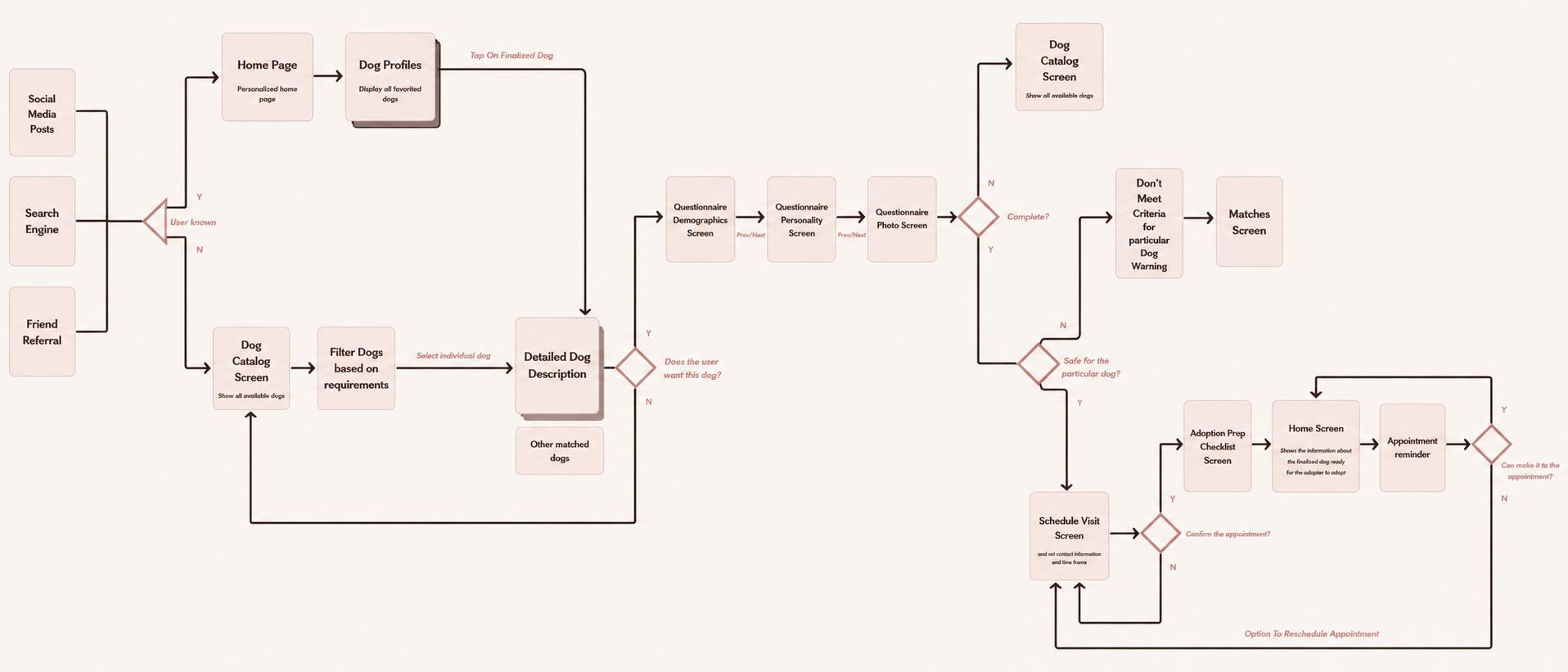
The experienced owner skips the hand-holding. They go straight to the dog catalog, filter by what they need, and pick a dog themselves. The questionnaire still appears, but later, and for a different reason. Once they've chosen a dog, it runs a compatibility check: is this specific dog the right fit for their home? Same questions, different purpose.
Same destination. The app just knew which traveler it was talking to.
The Axure prototype was the final course deliverable. And it worked.
Clickable navigation, testable flows, the full grammar brought to life in a mid-fi prototype. After the course, I rebuilt the screens in Figma and polished them to hi-fi using Figma Make, to show what the match actually feels like, not just how it works.
Flow 01: Finding Your Match
The first-time owner path: onboarding → questionnaire → AI matches → dog details → schedule a meet → homepage after scheduling.
Once a user schedules a visit, the homepage shifts entirely. It stops showing other dogs and pivots to showing everything about the dog they're meeting: the upcoming appointment details, the dog's diary, more information about their match. The decision was intentional: once you've scheduled, the app's job is to get you excited about this dog, not distract you with others.
Flow 02: The Experienced Owner Path
Experienced owner path: generic homepage → browse catalog → filter → dog details → compatibility check → schedule a meet.
The Rest of the App
Two flows don't make an app. Five more pages round out the experience:
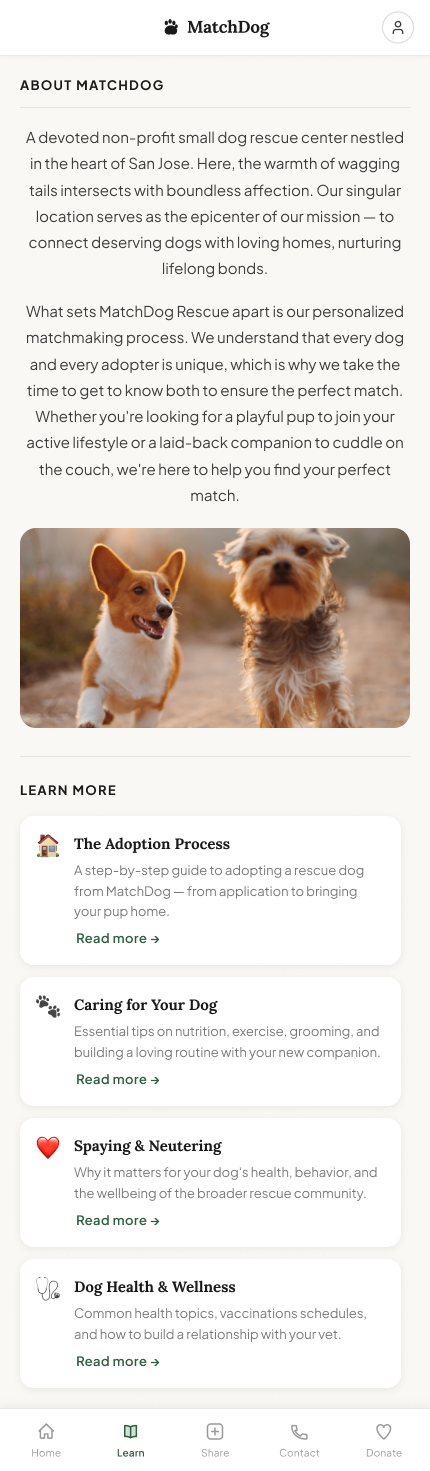
Educational content on the adoption process, dog care, spaying and neutering, and dog health.
Post-adoption photos and stories from other adopters: a space to celebrate the matches that worked.
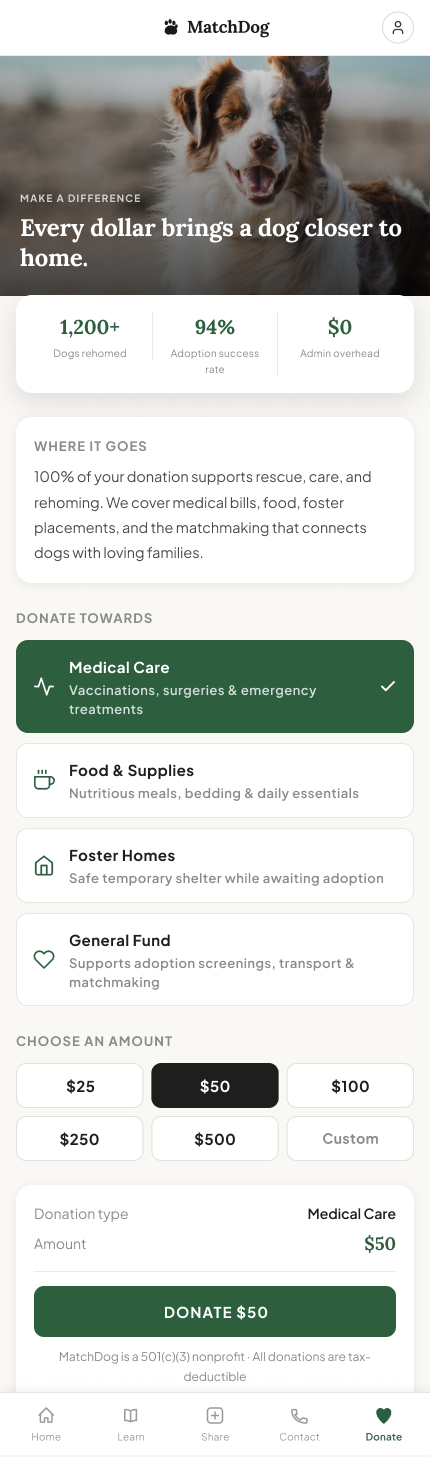
Mission-forward giving page. Large donations can be matched with a robot dog.
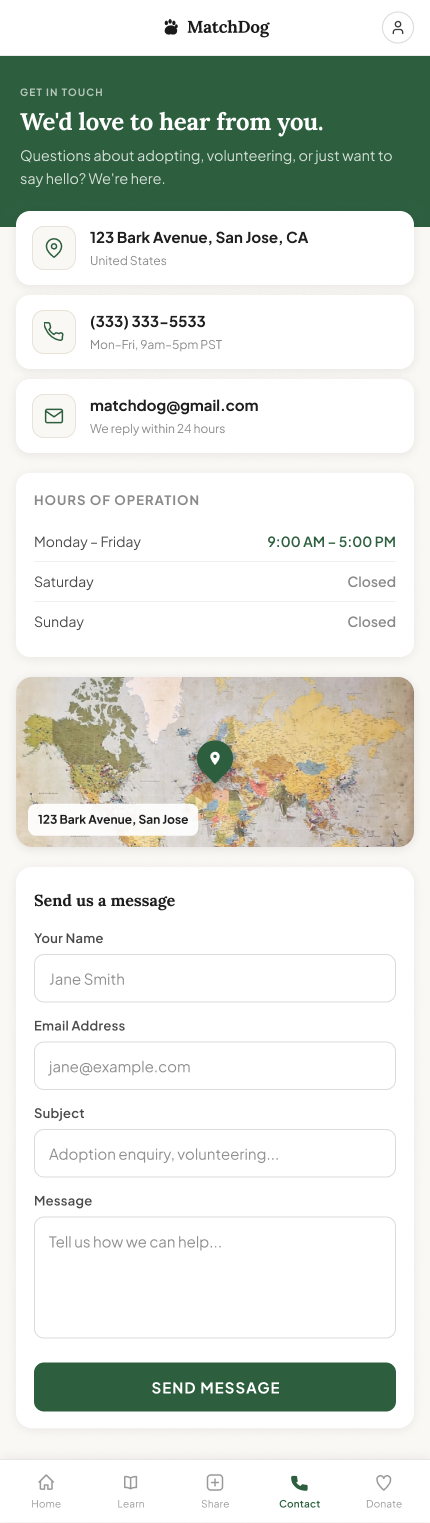
Shelter address, phone, email, and a contact form.
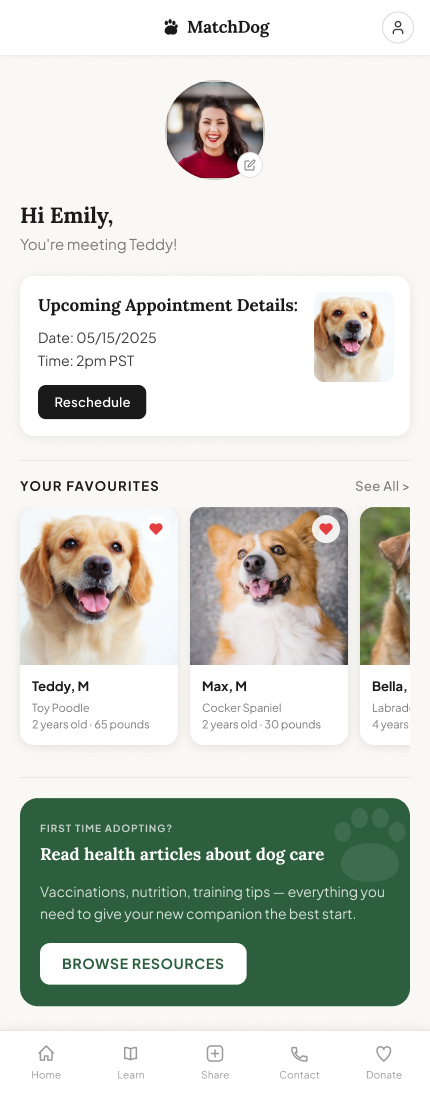
User preferences, upcoming appointments, and favorited dogs.
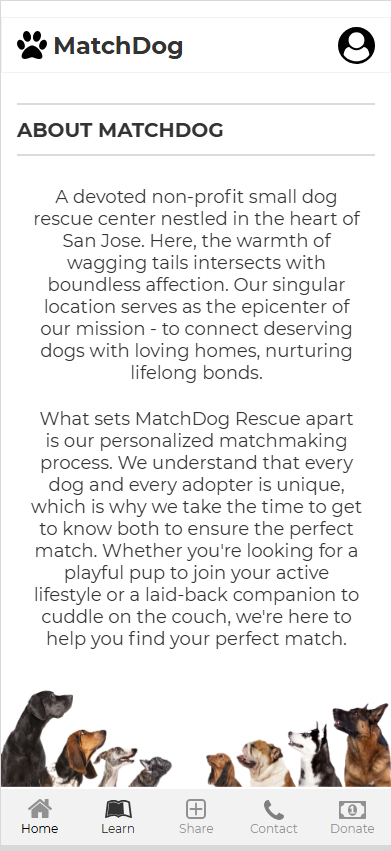
Educational content on the adoption process, dog care, spaying and neutering, and dog health.
Post-adoption photos and stories from other adopters: a space to celebrate the matches that worked.
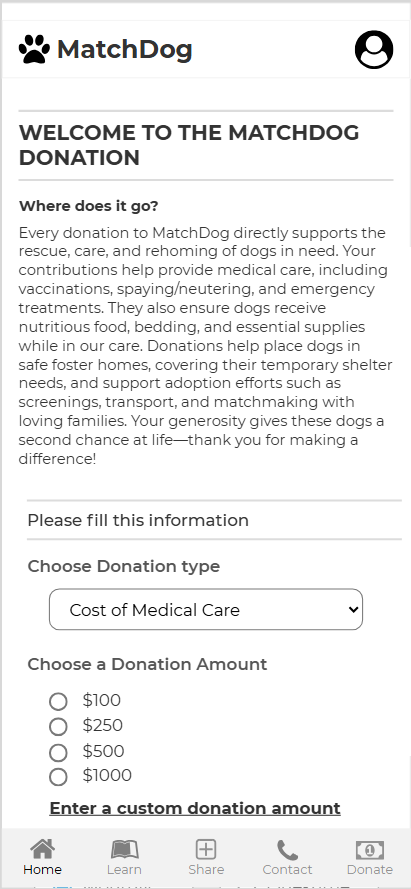
Mission-forward giving page. Large donations can be matched with a robot dog.
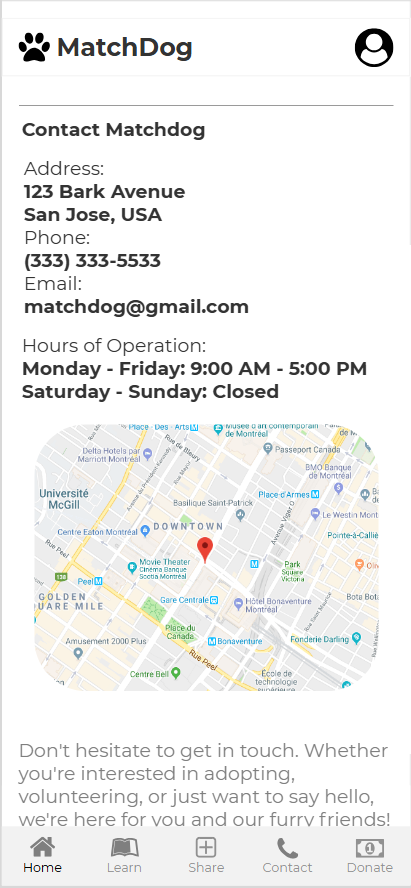
Shelter address, phone, email, and a contact form.
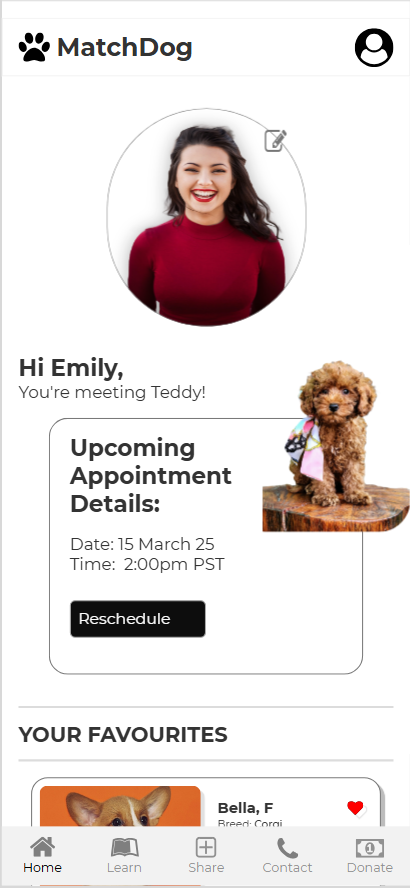
User preferences, upcoming appointments, and favorited dogs.
This was the project where the foundation stopped being a formality.
I knew it. I hadn't felt it.
Objects, actions, attributes, prioritization. I'd read it, understood it. But understanding a method and trusting it are different things.
The home screen wasn't a guess. It was a consequence.
The grammar figured out the navigation. Structure-first design doesn't slow you down. It makes every decision after it faster and easier to defend.
I haven't designed without it since.
I came into UX from CS, where getting the architecture right before building is just assumed. MatchDog was the moment I found the UX equivalent of that.